
Let banned members appeal
When you ban someone, Appealy can send them a form to ask to come back. Your staff accept or deny it, and accepting unbans them for you.
-
Make an appeal form
In Forms, press New form and pick the Ban appeal template. Choose a Log channel (where appeals arrive, staff only) and press Create form.
-
Turn on ban appeals
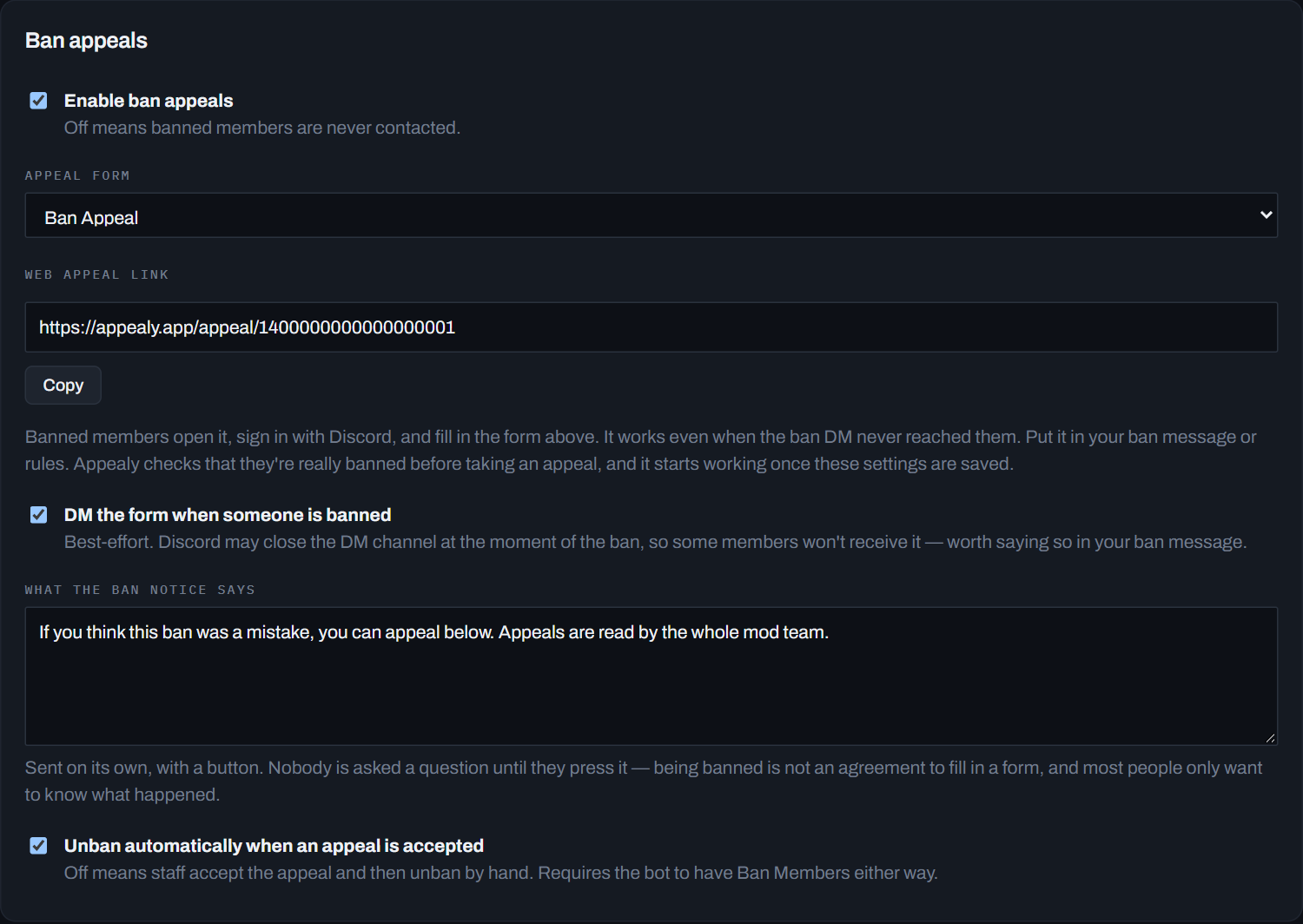
Click Appeals (under Applications). Tick Enable ban appeals and pick your form under Appeal form.
-
Choose how they find it
DM the form when someone is banned: Appealy DMs the person with an Appeal this ban button. Discord doesn’t always deliver it, so share the link below too.
Web appeal link: a link that always works, even when the DM doesn’t arrive. Press Copy and put it in your rules or your ban message.
-
Press Save
What happens next
- The banned person fills in the form, in their DMs or on the web link (after signing in with Discord).
- The appeal shows up in the form’s Log channel with Accept and Deny.
- Accept unbans them, as long as Unban automatically when an appeal is accepted is ticked. Deny tells them no.
Timeouts and restrictions too
The same page has Timeout appeals and Restriction appeals (for a “muted” style role). They work the same way: enable, pick a form, save.
Stuck on a step? Ask in the support server, or see all guides.